
 DA
DAWhat is interactive video? And what is a video overlay?
Home Interactive video What is interactive video?
What is interactive video?
A video platform is software for sharing and distributing videos. An interactive video platform does the same, but also lets the viewer take part in the video: answer questions, make choices and click through to more information. That makes it especially useful for teaching students and for training and developing staff.
We take in a lot of information visually, and video is a natural way to explain something that is hard to put into words. That is one reason it works well for learning. Interactive elements go one step further, because the viewer takes part instead of only watching.
Are you thinking about working with interactive video? We can advise you on the possible solutions.
Viducon is the official hihaho partner in Denmark. We handle implementation, support and workshops for your organisation, from the first demo through to daily use.

Why work with interactive videos?
Why it works
- The viewer gets something to do, not only something to watch.
- Questions along the way show both the viewer and you what has been understood.
- Results can be followed up, for example through SCORM or xAPI in your learning platform.
- Video is already part of everyday life: about two thirds of all internet traffic is video (65 % in 2022), according to Sandvine’s Global Internet Phenomena Report 2023.
There are many good reasons to use interactive video when you plan teaching, education and training. Whether you are teaching students or training employees, video is becoming hard to avoid.


Interactive video software – what will you use it for?
There are many kinds of software for making interactive video, and the choice should depend on what it will be used for. For teaching and training, in both education and business, it matters most that the software is easy to use.
Ideally, educators, trainers and course leaders should all be able to work in it. If the software will be used to edit video every day, it is more sustainable and scalable when it is intuitive, so that anyone in the organisation who needs video and interactivity can pick it up.
We are happy to talk it through and guide you on the different types of platforms for creating interactive video overlays.
Types of interactive video platforms
There are many platforms for making interactive video, and you should consider how advanced you need it to be. Some come as software, such as Adobe, which is powerful but also complex.
Others are more user-friendly, for example hihaho. When you edit an interactive video, what matters most is having all the options within easy reach, so you don’t have to hunt for layers or switch between programs.
Consider the price as well, so you buy what you actually need. Some providers sell interactive video overlays at a reasonable price but only offer very basic options, such as “pause” or “question”. Others offer a full interactive platform.

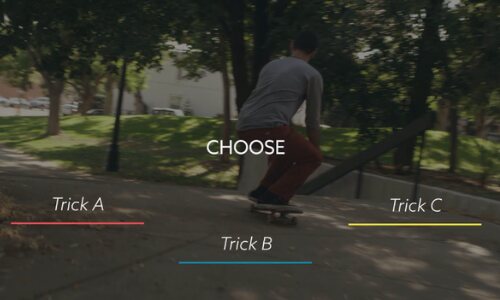
What is a video overlay?
A video overlay is a layer placed on top of your video. In interactive video, it is a layer added on top of an existing video, which lets the viewer interact with it. A traditional video plays from start to finish, perhaps with the option to rewind. With an overlay, you can build videos that the viewer can navigate.
When you edit with an overlay, you can add elements such as questions, highlights and hotspots. For the viewer, it feels like an interactive world: they can jump between sections, answer questions, zoom in and out, scroll and more.
Read more about hihaho
Hihaho is the interactive video platform we work with. These pages show what it can do and what it costs.
– Five problems that hihaho solves
– Hihaho at Viducon's Conference 2026
– Hihaho ressources (in Danish)